

Experience seamless banking in your hand.
Hana Bank USA offers a full line of electronic banking applications
and services to meet all of your needs.
Your banking experience should be smooth, secure and the same on all your devices.
No matter where you are or what device you want to use, you can:
Stay connected — and in control.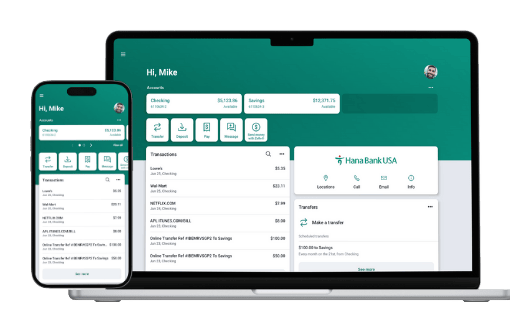
Our Digital Banking makes it easy to:
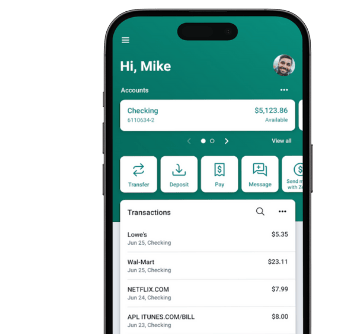
 Mobile deposits
 Schedule recurring payments
 Transfer money at any time
 Chat with support staff
 Manage debit card if lost or stolen
 View monthly statement
How to enroll in Online & Mobile Banking


FAQs
I can’t log into my online / mobile banking. What would be the problem?
-
Verify if your username and password have been entered correctly without any typo.
-
Ensure that your device is well connected to the Wi-Fi or data network.
-
For security reasons, your online/mobile banking access will be locked after 3 unsuccessful login attempts. To unlock your access, please contact a Universal Banker.
-
If you have not accessed your online/mobile banking for 6 months or more, please contact a Universal Banker for assistance.
I forgot my digital banking ID and password. How can I recover my account?
-
To recover a username and password, select “Forgot?” located on the sign-in screen.
-
For security purposes, you must provide one of the following to recover your username and/or reset your password:
-
Username and Email. If you can’t remember this information, you select “Try another way”
-
-
-
By entering your Social Security Number (SSN) for consumers or Employer Identification Number (EIN) for businesses, and your Account Number.
-
-
If you are having difficulty, please contact a Universal Banker for assistance.
What is an Authy app? Is it necessary to download it?
The Authy App is a two-factor authentication (2FA) app that helps protect your online accounts by adding an extra layer of security. You may also select text or phone call for other methods of two-factor authentication.
How can I change my contact information?
To update your email, and/or mobile number:
- Click "Settings" under "Profile"
- Click "Edit" to update your contact information.
HOW CAN I CHANGE MY ADDRESS?
To update your address:
- Click "Settings" under "Profile"
- Click "Edit Address" to update your address information.
how do i enroll in E-statement?
Please find the instructions to go paperless and receive eStatements below:
1) Log into the Hana Bank USA online or mobile banking
2) Click your account button on the Dashboard
3) Select the option for e-Statements enrollment
4) Click to enroll for e-Statements
Kindly be advised that once you have enrolled for e-Statements, you will be able to view your statements online only from the time you have enrolled going forward.
1) Log into the Hana Bank USA online or mobile banking
2) Click your account button on the Dashboard
3) Select the option for e-Statements enrollment
4) Click to enroll for e-Statements
Kindly be advised that once you have enrolled for e-Statements, you will be able to view your statements online only from the time you have enrolled going forward.
 Contact us
We are here when you need us. Wherever you are,
you can always reach us with any questions or concerns.
 Location